
5+ Best Web Hosting Providers: Need the Best Fit in 2026?
🌐 Looking for the best web hosting providers to kickstart or upgrade your website?
You’re in the right place! 🚀
This guide is packed with everything you need top recommendations, real pros & cons, and tips on which hosting suits your exact purpose.
Whether you’re launching a simple blog, running an e-commerce store, or scaling a high-traffic website, I’ll break it down so you can make the right choice without confusion. 🎯
5+ Best Web Hosting Providers: Which One’s the Perfect Fit for You in 2026?
Here’s my curated list of hosting providers that consistently perform well across speed, uptime, support, scalability, and pricing. Each has its own strengths and trade-offs, so I’ll also suggest what types of projects they’re most suitable for.
1. Cloudways 🌐

Cloudways is a managed cloud hosting provider that allows you to host your website on powerful cloud infrastructure like AWS, Google Cloud, and DigitalOcean.
Unlike traditional hosting services, Cloudways provides you with a custom dashboard to easily manage, scale, and optimize your server. It’s perfect for businesses and developers who need robust performance with minimal hassle.
Type: Managed Cloud Hosting
Why it stands out:
Cloudways acts as a bridge between you and big cloud providers like DigitalOcean, AWS, Google Cloud, Vultr, and Linode. Instead of dealing with raw servers, Cloudways provides an easy-to-use platform with one-click scaling, built-in caching (Varnish, Redis, Memcached), staging environments, and automated backups.
Key Features:
- Choice of Cloud Providers:
You can pick infrastructure from DigitalOcean, AWS, Google Cloud, Vultr, or Linode. This gives flexibility to balance price vs. performance. - SSD-Based Servers:
SSDs load websites faster than traditional drives, reducing bounce rates and improving SEO. - Built-in Caching (Varnish, Redis, Memcached):
These speed boosters help handle high traffic without slowing down. - Automatic Backups:
Daily or on-demand backups protect your site if something goes wrong. - Pay-As-You-Go Pricing:
Unlike shared hosting with fixed costs, you pay only for resources you actually use.
👉 Why it matters: Cloudways is essentially a “managed wrapper” around big cloud platforms giving you cloud power with less complexity.
Pros ✅
- High-performance hosting with flexible scaling
- Great for apps, e-commerce, and growing websites
- Transparent pricing per cloud provider
- Multiple data centers worldwide
Cons ❌
- No email hosting or domain registration
- Beginners may find the setup slightly technical
- More expensive than basic shared hosting
Cloudways Pricing 💰

- Large – $99/month (≈ $0.1473 hourly)
- Micro – $14/month (≈ $0.0208 hourly)
- Small – $28/month (≈ $0.0417 hourly)
- Medium (Most Popular) – $54/month (≈ $0.0804 hourly)
Best for:
Medium to large sites, WooCommerce stores, SaaS apps, and businesses planning for growth.
2. SiteGround 🚀

Known for its excellent customer support and superior performance, SiteGround has earned a reputation as one of the best shared hosting providers. Powered by Google Cloud, SiteGround offers fast, reliable hosting optimized for WordPress.
With features like automatic backups and staging environments, SiteGround is perfect for growing websites and small businesses looking for hassle-free hosting solutions.
Type: Shared / Managed / Cloud / WordPress Hosting
Why it stands out:
SiteGround has built its reputation on excellent customer support and reliable uptime. Now powered by Google Cloud infrastructure, it ensures blazing fast speeds and global availability.

Key Features:
- Powered by Google Cloud:
Your website runs on Google’s fast, secure, and global infrastructure. - Daily Backups & Easy Restores:
Protects against accidental changes, hacks, or crashes. You can roll back with one click. - Staging Environment:
Lets you test new designs, plugins, or updates safely before making them live. - AI Security + Web Application Firewall (WAF):
Blocks brute-force attacks and malware attempts automatically. - Free CDN & SSL:
Ensures faster global access and encrypted connections for better trust and SEO.
👉 Why it matters: SiteGround is like a safety net for small businesses strong protection, reliable support, and optimized for WordPress.
Pros ✅
- WordPress-optimized, recommended by WordPress.org
- Excellent uptime (99.99% observed in tests)
- Great for small to medium businesses
- Intuitive dashboard and migration tools
Cons ❌
- Renewal pricing nearly doubles
- Entry-level plans have strict resource limits
- Cloud hosting can get pricey as you scale
SiteGround Pricing 💰
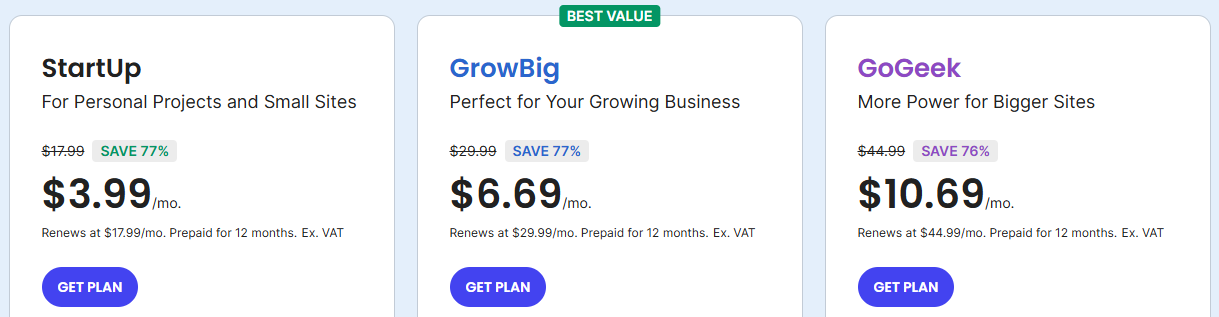
- StartUp – $3.99/month (renews at $17.99/month)
- GrowBig (Best Value) – $6.69/month (renews at $29.99/month)
- GoGeek – $10.69/month (renews at $44.99/month)
Best for:
Small businesses, WordPress websites, professional blogs, and users who prioritize support and reliability.
3. Bluehost 💻

Bluehost is a beginner-friendly hosting provider known for its seamless WordPress integration. It’s affordable, easy to set up, and offers great support, making it a top choice for new website owners.
Whether you’re starting a blog, portfolio, or small business site, Bluehost provides everything you need to get your site up and running quickly, without the technical complexities.
Type: Shared / VPS / Dedicated / WordPress Hosting
Why it stands out:
One of the most popular names in hosting, Bluehost is officially recommended by WordPress.org. It’s a beginner-friendly option with simple setup, free domains, and plenty of plan flexibility.
Key Features:
- Free Domain for 1 Year:
Saves cost when launching a new website. - One-Click WordPress Install:
No technical setup just click, and your WordPress site is ready. - cPanel Dashboard:
User-friendly control panel for managing files, domains, emails, and databases. - Free SSL Certificate:
Keeps your site secure and improves Google ranking. - Scalable Hosting (Shared → VPS → Dedicated):
You can start small and upgrade as your traffic grows.
👉 Why it matters: Bluehost makes starting a website less intimidating for beginners with bundled features.
Pros ✅
- Easy setup for beginners
- Variety of hosting types (good upgrade path)
- Good integration with WordPress and WooCommerce
- Affordable entry-level pricing
Cons ❌
- Renewal costs can be high
- Performance under heavy load isn’t the best
- Extra upsells during checkout
Bluehost Pricing 💰

- Starter – ₹199/month (renews at ₹349/month)
- Business (Recommended) – ₹279/month (renews at ₹529/month)
- eCommerce Essentials – ₹649/month (renews at ₹1299/month)
Best for:
Beginners, small businesses, personal blogs, and first-time WordPress users.
For a more in-depth analysis, check out our comprehensive Bluehost Review . This detailed review covers performance, customer support, and real-world use cases to help you make an informed decision.
4. A2 Hosting ⚡

For speed and performance, A2 Hosting stands out with its Turbo Servers, which offer up to 20x faster load times compared to standard hosting. A2 Hosting is ideal for users who need fast, developer-friendly hosting with a high level of control.
Whether you’re a developer looking to customize your server stack or a business needing high performance, A2 Hosting offers both affordability and top-tier performance.
Type: Shared / VPS / Managed / Dedicated Hosting
Why it stands out:
A2 Hosting is known for speed-focused “Turbo Servers” that promise up to 20x faster performance. It also caters to developers with support for multiple programming languages and custom configurations.

Key Features:
- Turbo Servers (Up to 20x Faster):
Uses NVMe SSDs and LiteSpeed caching to deliver ultra-fast websites. - Free Site Migration:
Their team moves your website for free if you’re switching hosts. - Anytime Money-Back Guarantee:
Unlike most hosts, you can request a refund anytime (not just within 30 days). - Developer-Friendly Stack:
Supports PHP, Node.js, Python, Ruby, MySQL ideal for custom apps. - 24/7/365 Support:
Phone, chat, or email support is available around the clock.
👉 Why it matters: A2 Hosting balances developer control with speed great if you’re technical or want high performance.
Pros ✅
- Great speed and performance
- Strong developer tools and custom stack support
- Affordable plans for what they offer
- Generous refund policy
Cons ❌
- Turbo performance only in premium plans
- Fewer data center locations compared to global giants
- Not as beginner-friendly as Bluehost/SiteGround
A2 Hosting Pricing 💰
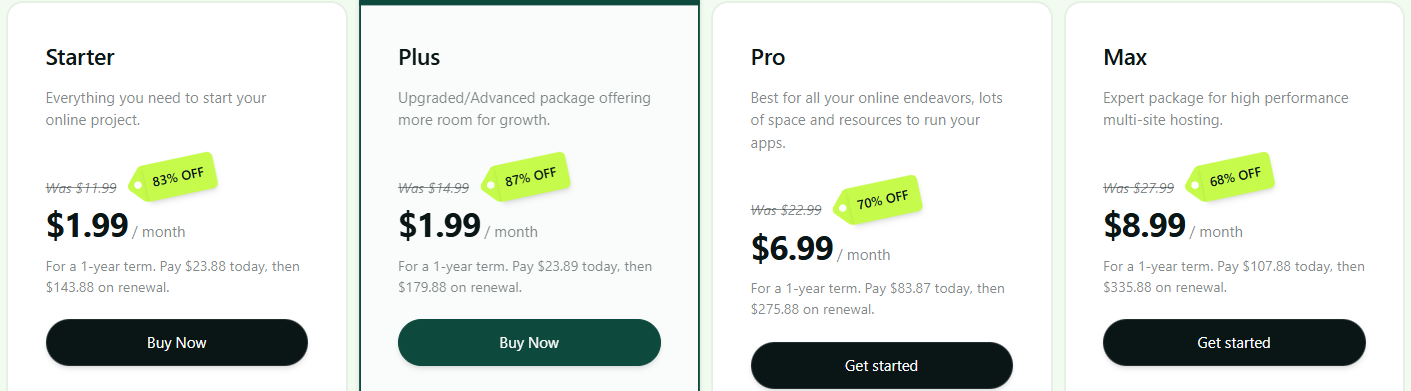
- Starter – $1.99/month (renews at $143.88/year ≈ $11.99/month)
- Plus (Most Popular) – $1.99/month (renews at $179.88/year ≈ $14.99/month)
- Pro – $6.99/month (renews at $275.88/year ≈ $22.99/month)
- Max – $8.99/month (renews at $335.88/year ≈ $27.99/month)
- Get the best deal with our A2 Hosting Coupon Code for up to 78% off!
Best for:
Performance-focused users, developers, agencies, and businesses on a lean budget.
5. Kinsta / WP Engine 🏆

If you’re looking for premium, fully-managed WordPress hosting, Kinsta and WP Engine are the top choices. Powered by Google Cloud’s premium tier, both providers offer elite performance, top-notch security, and exceptional support.
Ideal for high-traffic WordPress websites, they provide automatic updates, staging environments, and everything you need to keep your site running at peak performance.
Type: Premium Managed WordPress Hosting
Why it stands out:
If you want the Rolls Royce of WordPress hosting, Kinsta and WP Engine are the names to know. Both use Google Cloud Platform’s premium tier network, providing high availability and speed.

Key Features:
- Built on Google Cloud Premium Tier:
Your site runs on the same network as Google services (low latency, high reliability). - Fully Managed WordPress Hosting:
Automatic updates, security patches, and performance tuning. - Daily Backups + One-Click Restore:
Peace of mind for businesses running mission-critical sites. - Staging Environments:
Safely test design or code changes before pushing live. - Free CDN + Enterprise Security:
Global speed boost and protection against DDoS or hacks.
👉 Why it matters: These are premium options best for businesses where uptime, speed, and expert WordPress support directly impact revenue.
Pros ✅
- Extremely reliable and secure
- Excellent support with WordPress experts
- Optimized for high-traffic WordPress websites
- Global server network
Cons ❌
- Pricey compared to shared hosting
- Overkill for beginners or small blogs
- Only suitable for WordPress sites
Kinsta / WP Engine Pricing 💰
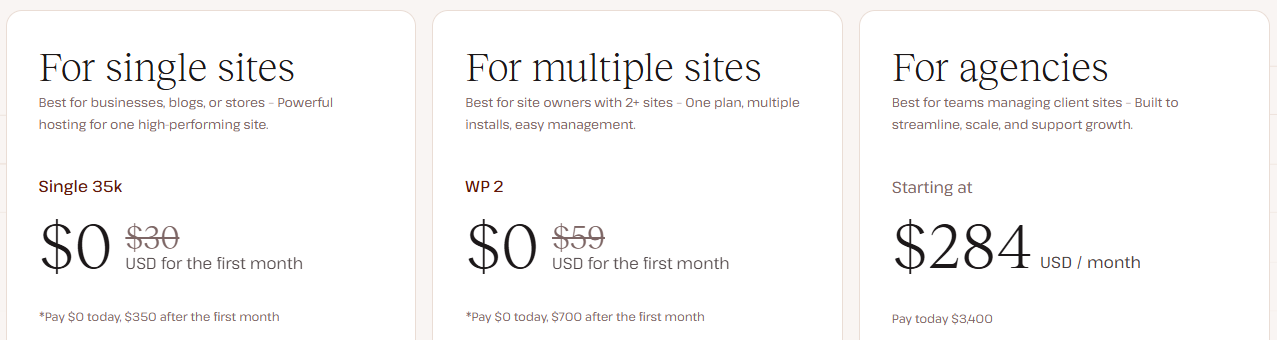
- For Single Sites (Single 35k) – $0 first month, then $350/month
- For Multiple Sites (WP 2) – $0 first month, then $700/month
- For Agencies – Starting at $284/month (billed $3400 annually)
Best for:
Agencies, enterprises, high-traffic WordPress blogs, and businesses that can justify premium pricing for peace of mind.
6. Hostinger 🌍

Hostinger offers budget-friendly hosting without compromising on quality. Known for its easy-to-use interface and solid performance, Hostinger is perfect for those just starting out with websites.
Whether you need a personal blog or a small business website, Hostinger offers great value with features like free SSL, email hosting, and scalable plans as your site grows.
Type: Shared / VPS / Cloud Hosting
Why it Stands Out
Hostinger has built a strong reputation for being one of the most affordable yet reliable hosting providers worldwide. It offers beginner-friendly tools, fast servers with LiteSpeed technology, and localized data centers (including India, US, Europe, and Asia).
Unlike many budget hosts, Hostinger combines low cost with solid performance making it perfect for small businesses and individuals who want professional hosting without breaking the bank.

Key Features
If your site outgrows shared hosting, you can move to Hostinger Cloud Hosting, which offers dedicated resources and better performance.
- hPanel (Beginner-Friendly Dashboard)
- Hostinger uses its own control panel called hPanel instead of cPanel.
- It’s lightweight, clean, and designed for beginners easy to manage domains, emails, and files.
- Global Data Centers (Including India)
- Servers are located in the US, UK, Netherlands, Singapore, and India, ensuring faster load times for local audiences.
- If your target market is India, Hostinger is a standout choice.
- Free SSL Certificates
- Every plan comes with free SSL (HTTPS), which secures your site and improves Google SEO ranking.
- Free Email Hosting
- Even on basic plans, you get at least one email account (e.g., [email protected]).
- Professional emails build trust with your customers.
- LiteSpeed Servers + Cache Manager
- Hostinger uses LiteSpeed Web Server, which is faster than Apache or NGINX.
- The built-in caching plugin boosts performance, making even shared hosting sites load quickly.

Pros ✅
- Very affordable entry-level pricing.
- hPanel is easier to use than cPanel for beginners.
- Local data centers in India → low latency for Indian websites.
- LiteSpeed technology makes it faster than many shared hosts.
- Free SSL and email included (no hidden cost).
Cons ❌
- No free daily backups on lowest-tier plan (you need higher-tier or add-on).
- Renewal prices are higher than intro offers.
- Customer support is helpful but sometimes slower during peak hours.
Hostinger Pricing 💰
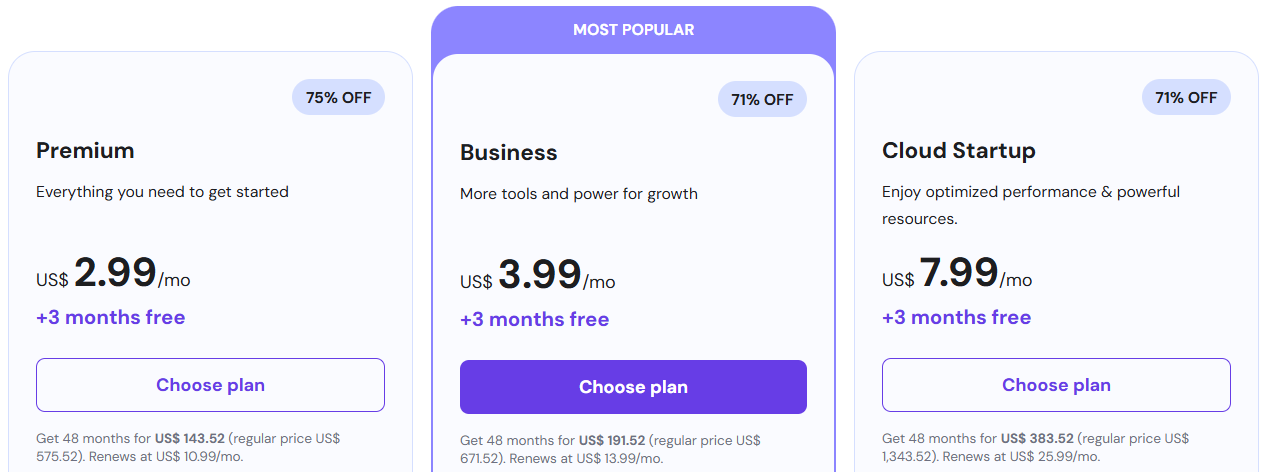
- Premium – $2.99/month (+ 3 months free)
- Business (Most Popular) – $3.99/month (+ 3 months free)
- Cloud Startup – $7.99/month (+ 3 months free)
- For more details and exclusive savings, check out our Hostinger Coupon Code to get Upto 79% off + 3 Months Free!
Best For 🎯
- Beginners: Easy setup, cheap, and beginner-friendly tools.
- Small Websites/Blogs: Great for personal blogs, portfolios, or small businesses.
- India-based Websites: Excellent speed due to local data center.
- Budget-Conscious Users: Those who want reliable hosting without premium costs.
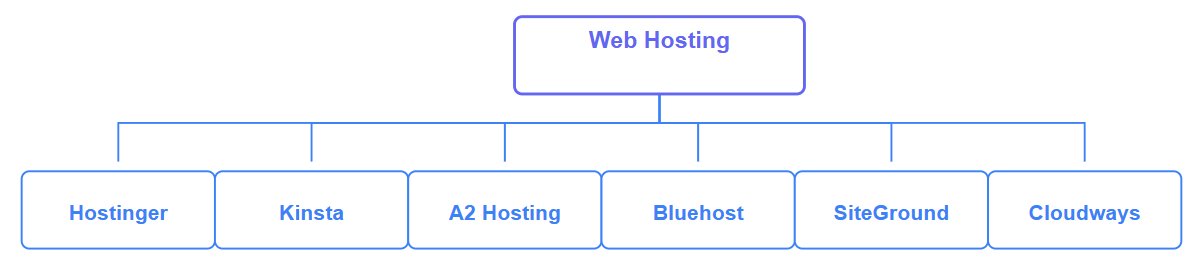
Web Hosting Comparison Table (2026)
Compare the top 5+ web hosting providers to find the perfect fit for your website. This table highlights key features, performance, pricing, and more for 2026’s best options.
| Provider | Performance | Support | Ease of Use | Scalability | Best For |
|---|---|---|---|---|---|
| Cloudways | Fast | 24/7 | Moderate | High | Growing Sites |
| SiteGround | Reliable | Excellent | Easy | Medium | WordPress Sites |
| Bluehost | Good | Good | Very Easy | Medium | Beginners & Blogs |
| A2 Hosting | Fast | 24/7 | Moderate | High | Developers |
| Kinsta | Premium | Excellent | Easy | High | High-Traffic WP Sites |
| Hostinger | Solid | Good | Very Easy | Medium | Budget-Conscious |
Explanation of the Table:
- Performance:
Describes speed and uptime reliability. - Support:
How responsive and helpful customer service is. - Ease of Use:
How user-friendly the hosting provider’s interface and setup are. - Scalability:
How easily your website can grow as traffic increases. - Best For:
Indicates the ideal use case or target audience.
Which One Should You Choose for Different Purposes?
Here are practical recommendations based on what your project requires:

| Use Case / Purpose | My Recommended Provider(s) | Why |
|---|---|---|
| 1. Simple blog, portfolio, low traffic site | Bluehost, Hostinger, A2 Hosting | Low cost, easy to get started |
| 2. WordPress site with moderate traffic | SiteGround, Bluehost Managed WP, Kinsta (if budget allows) | Optimized stacks, caching, WP support |
| 3. E-commerce / WooCommerce store | Cloudways, WP Engine, SiteGround (high tier) | Performance, security, scaling, optimized for dynamic content |
| 4. High-traffic / growing site | Cloudways, Kinsta | Scalability, strong infrastructure, premium performance |
| 5. Web applications (non-WP) / custom stack | Cloudways | Flexibility, control, and custom server setup options |
| 6. India / Local Audience Focus | Hostinger (Indian datacenter) | Local servers ensure low latency, faster speeds, and better experience for Indian users |
Why Is It Crucial to Choose the Best Web Hosting? ⚡
Your website’s performance, speed, and reliability depend heavily on your hosting provider. If you pick the wrong one, you may face:

- Slow websites that drive visitors away
- Frequent downtime that hurts your credibility
- Security risks like hacks or data loss
On the other hand, a good hosting provider ensures smooth performance, better SEO rankings, and peace of mind.
👉 That’s why in this article, I’ve listed the best web hosting providers for 2026 so you know which companies deliver real value.
Migration, Scaling & Future-proofing
- Migration:
- Many hosts offer free or paid migration services. Always keep backups before switching.
- Scaling:
- Ensure your architecture allows vertical (more CPU, RAM) or horizontal scaling (adding nodes).
- Monitoring:
- Use uptime monitors, performance analytics (e.g. Google PageSpeed, GTmetrix) to check health.
- Be ready to move:
- Don’t lock yourself in. Use hosts with standard stacks (Linux, Apache/Nginx, MySQL/MariaDB) to make future migration easier.
- Optimize continually:
- Caching, lazy loading, image optimization, database tuning these matter no less than the host.
Final Recommendation & My Picks 🎯

If I were to pick one all-rounder hosting provider for 2026 that balances performance, ease, support, and flexibility, I’d lean toward:
- Cloudways (for growth and scalability)
- SiteGround (for WordPress/general sites)
👉 If your budget is tight and your site is simple, Bluehost or Hostinger are excellent starting points. As your traffic and feature needs grow, you can upgrade to a more scalable host.
Here’s my mini top picks list:
- Best overall / scalable choice: Cloudways
- Best for WordPress / ease-of-use: SiteGround
- Best for beginners / budget: Bluehost / Hostinger
- Best premium managed WP: Kinsta / WP Engine
- Best value-for-money hosting: Hostinger (affordable pricing with solid performance)
FAQs
It depends on your needs. Cloudways is best for scalability, SiteGround for WordPress, and Hostinger/Bluehost for beginners on a budget.
Hostinger and A2 Hosting offer some of the lowest prices, starting under $3/month.
Yes, shared hosting is affordable and easy to use, making it ideal for blogs, small sites, and personal projects.
Absolutely. Most providers like Cloudways, SiteGround, and Bluehost allow you to upgrade to higher plans as your traffic grows.
SiteGround, Kinsta, and WP Engine are optimized for WordPress, offering better speed, security, and management.
