
5+ Best Accounting Software for Small Businesses in 2026
Managing your business finances doesn’t have to be hard!
💼 The right accounting software can simplify invoicing, payroll, and tax calculations.
🚀 In this guide, we’ll explore the top 5+ accounting software to help you save time and stay organized.
Whether you’re a small business owner or freelancer, these tools are designed for ease and efficiency.
Ready to streamline your finances?
Let’s dive in! ✨
What Does Accounting Software Do? A Quick Overview
Accounting software automates and simplifies financial management for businesses. It helps with tasks like invoicing, payroll, tax calculations, and financial reporting.
By tracking income and expenses, it provides real-time insights into your business’s financial health, ensuring accuracy and compliance.
Accounting software also saves time, reduces errors, and helps business owners make informed decisions.
Best Accounting Software for Small to Medium Businesses
Selecting the right accounting software is crucial for small to medium-sized businesses aiming to streamline financial operations, ensure compliance, and foster growth.

The ideal solution should offer a balance between affordability, scalability, and a comprehensive feature set tailored to the unique needs of SMEs.
In this guide, we explore top accounting software options that cater to various business requirements, from basic bookkeeping to advanced financial management.
1. QuickBooks Online
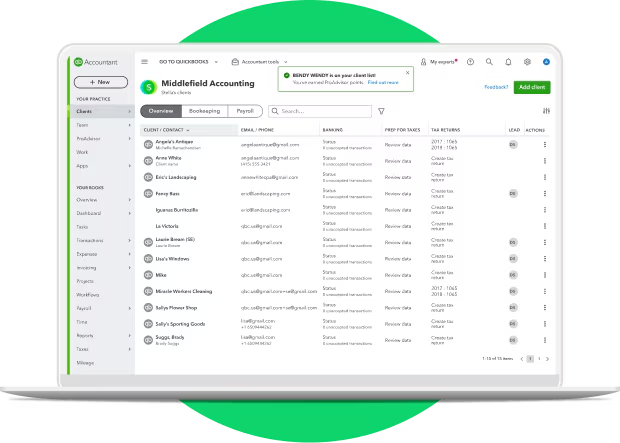
QuickBooks Online is one of the most popular and comprehensive accounting solutions, designed to simplify financial management for small to medium-sized businesses. It provides cloud-based accounting features with automatic backups, making it accessible from anywhere with an internet connection.
Key Features:
- Invoicing: Allows you to create and send custom invoices to clients.
- Payroll Management: Manages payroll processing, including tax calculations and employee payments.
- Tax Calculations: Calculates taxes automatically and helps in tax filing.
- Real-time Financial Tracking: Offers a real-time view of your business’s financial health, including income, expenses, and profits.
Why We Picked QuickBooks:
We picked QuickBooks Online as the clear winner because it offers a complete accounting solution for businesses of all sizes. It balances advanced functionality with an easy-to-use interface, making it perfect for owners who aren’t accounting experts but still want detailed control over finances.
Who It’s For:
- Small to medium-sized business owners
- Companies that require payroll, tax, and invoicing features in one solution
- Businesses looking for scalability as they grow
Why It’s Popular:
QuickBooks Online is known for its simplicity and ability to scale with your business. It offers a wide range of features, integrations with third-party apps, and mobile accessibility, making it perfect for business owners who want to manage their finances efficiently without being accountants.
Pros:
- Easy to use with a user-friendly interface.
- Extensive integrations with third-party apps.
- Scalable as your business grows.
- Excellent customer support.
Cons:
- May be complex for users with minimal accounting knowledge
- Can become costly as you scale and add more users.
- Limited customization options for reporting.
Pricing:

Starts at $5/month for self-employed users, with plans that scale up depending on the size of your business and features needed.
2. Zoho Books

Overview:
Zoho Books is a cloud-based accounting software that helps businesses automate accounting and financial tasks. It integrates seamlessly with other Zoho applications, making it a great choice for businesses already using Zoho’s CRM, inventory, and marketing tools.

Key Features:
- Financial Reporting: Generates detailed reports for income, expenses, taxes, and profitability.
- Project Management: Manages financials for individual projects, including time tracking and billing.
- Automated Workflows: Automates tasks like invoicing and reminders, saving time on manual processes.
Why We Picked Zoho Books:
Zoho Books is perfect for businesses looking for affordable automation. It saves time on repetitive tasks while providing the necessary tools to maintain financial control and clarity.
Who It’s For:
- Freelancers and small businesses
- Companies using other Zoho products
- Business owners wanting workflow automation
Why It’s Popular:
Zoho Books is well-loved for its affordable pricing, ease of use, and automation features. It’s also highly customizable, making it ideal for businesses that want to tailor the software to their specific needs.
Pros:
- Affordable pricing.
- Good automation features.
- Excellent customer support.
- Integrates well with other Zoho products.
Cons:
- Limited integration with third-party apps outside of the Zoho ecosystem.
- Can be difficult for beginners to learn.
- Lacks some advanced features compared to other tools.
Pricing:
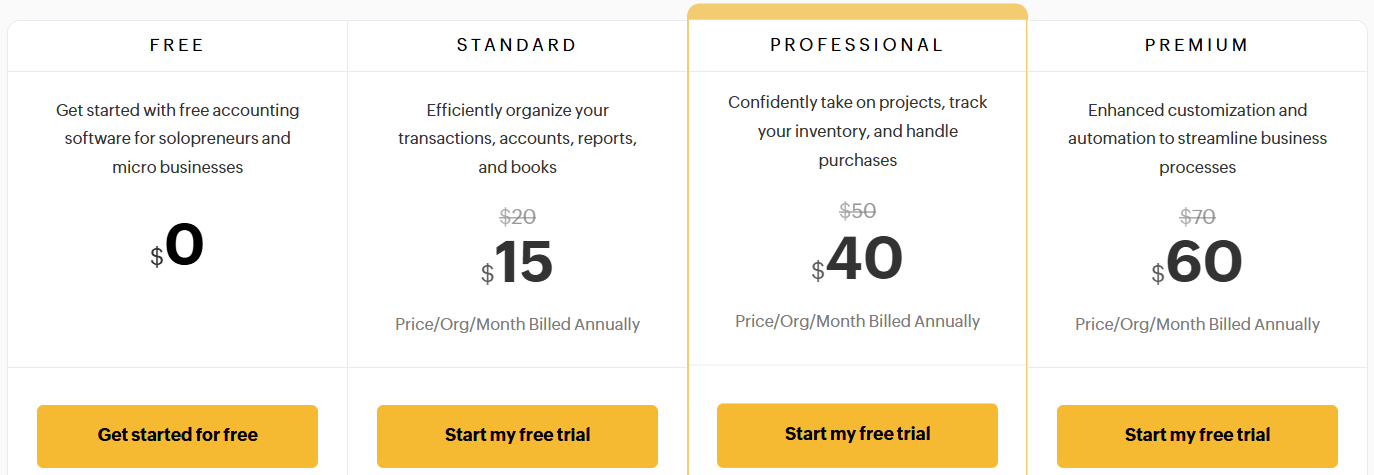
Starts at $15/month, making it a budget-friendly option for small businesses and freelancers.
3. Xero
Overview:
Xero is a powerful, cloud-based accounting software that is popular for its global reach and scalability. It’s particularly great for businesses that operate internationally, offering multi-currency support and integration with over 800 business apps.
Key Features:
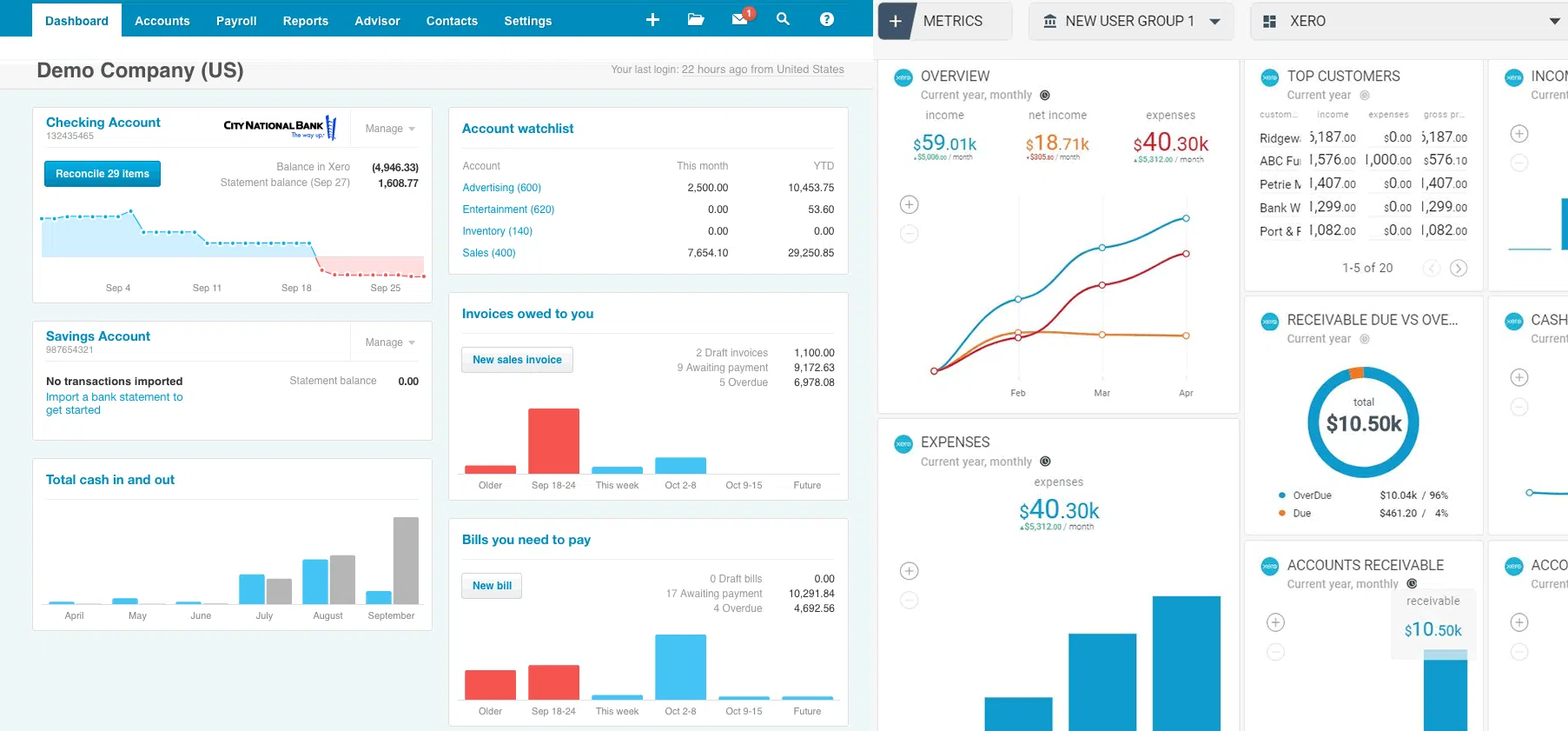
- Bank Reconciliation: Automatically matches bank transactions to your business records, ensuring accuracy.
- Inventory Management: Tracks products and supplies in real-time, helping businesses stay organized.
- App Integrations: Xero integrates with a wide range of third-party applications, enhancing its functionality for businesses with complex needs.
Why We Picked It:
Xero is our top choice for businesses with international needs. Its multi-currency, collaboration features, and app ecosystem make it highly versatile for expanding businesses.
Who It’s For:
- Small businesses with global operations
- Companies requiring multi-currency support
- Teams that collaborate with accountants and remote employees
Why Xero is Popular:
Xero’s ease of use, extensive integrations, and ability to handle international financial operations make it a favorite for businesses with a global footprint.
Pros:
- Excellent international capabilities (multi-currency).
- Great for collaboration with accountants and other team members.
- Strong integration options with third-party apps.
- Easy bank reconciliation.
Cons:
- Limited features in the basic plan.
- More expensive than some alternatives.
- Steep learning curve for beginners.
Pricing:

Starts at $29/month for the most basic plan, with more advanced plans for businesses that need extra features like payroll and multi-currency support.
4. Wave Accounting
Overview:
Wave Accounting is a free accounting software that offers a wide range of essential financial tools for small businesses, freelancers, and startups. It’s an excellent choice for those just starting out and looking for a simple yet reliable accounting solution without the cost.
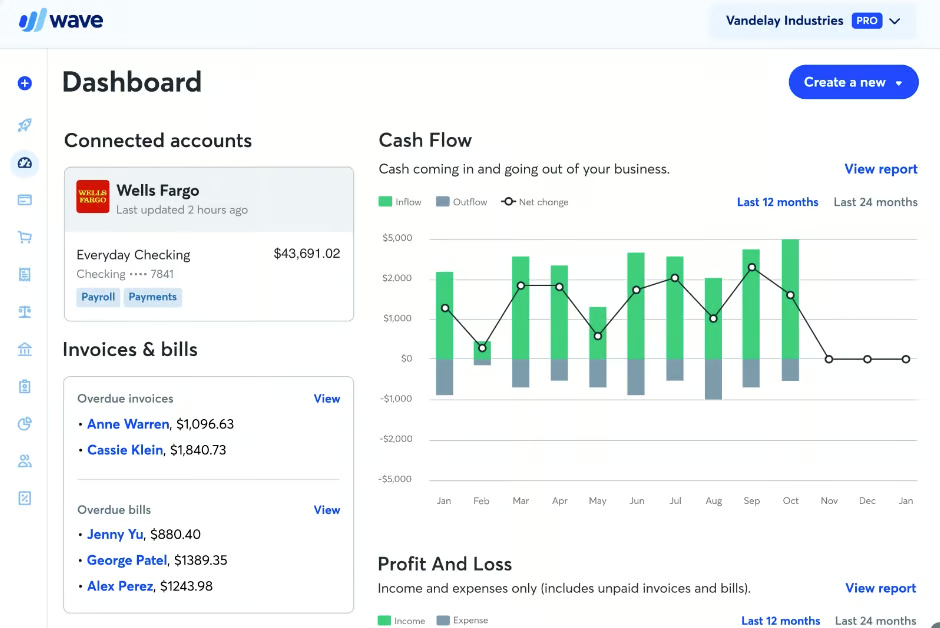
Key Features:
- Invoicing: Create professional invoices and track payment statuses.
- Expense Tracking: Keep track of business expenses with ease, ensuring that you stay within your budget.
- Payroll: Wave offers paid payroll services for businesses with employees (additional cost).
Why We Picked It:
Wave is our best free option, allowing startups and freelancers to manage accounting without spending money, while still offering optional payroll services.
Who It’s For:
- Freelancers and solo entrepreneurs
- Small businesses starting out with tight budgets
- Anyone needing free, reliable accounting tools
Why Wave is Popular:
Wave’s free accounting services make it an attractive choice for those on a tight budget, offering essential features like invoicing and expense tracking without charging a dime. The paid payroll feature is also highly affordable.
Pros:
- Free accounting services for basic features.
- Easy-to-use interface.
- Great for freelancers and small businesses with basic accounting needs.
Cons:
- Limited features in the free version.
- Paid payroll feature can be expensive.
- Lacks advanced functionality for larger businesses.
Pricing:

Starter Plan: $0
Perfect for freelancers or small businesses just starting out. Includes the basics for invoicing, expense tracking, and simple accounting features.
Pro Plan: $170 USD/year (billed annually)
Recommended for growing businesses. Comes with more polished features to help save time, improve cash flow, and handle more advanced needs.
5. FreshBooks
Overview:
FreshBooks is an easy-to-use accounting software primarily aimed at service-based businesses and freelancers. It’s known for its intuitive interface, which makes it a great choice for those who want to manage their accounting without the steep learning curve.
Key Features:
- Time Tracking: Perfect for service-based businesses that bill clients by the hour.
- Client Management: Organizes client information and interactions in one place.
- Project Billing: Allows businesses to track billable hours and expenses for projects.
Why It’s Popular:
FreshBooks is popular due to its user-friendly interface, making it easy for freelancers and service-based businesses to manage their accounting. It’s simple, yet packed with the features that small businesses need.
Pros:
- Great for service-based businesses and freelancers.
- User-friendly interface.
- Excellent invoicing and time-tracking features.
- Strong customer support.
Cons:
- Limited features for businesses with complex needs.
- Expensive compared to some other options.
- Lacks inventory management features.
FreshBooks Pricing:

Starts at $10.50 month, with pricing tiers based on the number of clients and features needed.
Comparison Table: Best Accounting Software
This comparison table will help you easily evaluate the top accounting software for small to medium-sized businesses. We’ve highlighted key features, pricing, and target audience for each tool to help you decide which one best fits your business needs.
Whether you’re looking for comprehensive financial management, easy invoicing, or global support, this table offers a quick glance at the differences between each solution.
| Software Name | Key Features | Target Audience | Pricing |
|---|---|---|---|
| QuickBooks Online | Invoicing, payroll, tax calculations, financial tracking | Small to medium-sized businesses | Starts at $25/month |
| Zoho Books | Financial reporting, project management, automated workflows | Freelancers, small businesses | Starts at $15/month |
| Xero | Multi-currency support, bank reconciliation, app integrations | Global businesses, growing companies | Starts at $12/month |
| Wave Accounting | Free invoicing, expense tracking, payroll (paid) | Freelancers, small businesses | Free (with paid payroll option) |
| FreshBooks | Time tracking, client management, project billing | Service-based businesses, freelancers | Starts at $15/month |

Key Differences:
- Business Focus:
- Each software is targeted at different business types QuickBooks for small to medium businesses, Zoho for freelancers and small businesses, Xero for international businesses, and FreshBooks for service-based businesses.
- Pricing:
- QuickBooks is the most expensive, while Wave Accounting offers a free core service, making it ideal for startups or those on a budget.
- Primary Strength:
- The strengths of each software vary, from automation and integrations (Zoho, Xero) to time tracking (FreshBooks) and comprehensive financial management (QuickBooks).
This approach gives a clearer distinction between each software, focusing on which businesses benefit most from each tool, along with a brief highlight of their main features.
Why Is Accounting Software Important for Businesses?
Accounting software is crucial for businesses as it helps streamline financial management tasks, ensuring accuracy and efficiency. Here’s why it’s so important:
- Time-Saving:
- Automates repetitive tasks like invoicing, payroll, and tax calculations, freeing up valuable time for business owners to focus on growth.
- Accuracy:
- Minimizes human error by automating calculations, ensuring that financial reports are accurate and compliant with regulations.
- Financial Insights:
- Provides real-time insights into your business’s financial health, helping you make informed decisions and track performance.
- Cost-Effective:
- Reduces the need for hiring a full-time accountant, especially for small businesses and freelancers, making financial management more affordable.
- Scalability:
- As your business grows, accounting software can easily scale to handle more complex transactions, multiple users, and various accounting needs.
Conclusion: Which Accounting Software Should You Choose?
Each of the accounting tools we’ve reviewed brings unique strengths to the table. The right choice depends on your business size, budget, and specific needs. Here’s a quick breakdown to help you decide:
- QuickBooks Online – Best for Scalability
A complete solution with invoicing, payroll, and tax features. Consider it if you want a platform that grows with your business. - Zoho Books – Best for Automation
Great for businesses that rely on automation and already use Zoho’s ecosystem. It’s especially useful for freelancers and small businesses. - Xero – Best for Global Operations
Perfect for companies working across borders. With multi-currency support and over 800 integrations, it’s designed for international growth.

- Wave Accounting – Best Free Starter Option
Ideal for freelancers and startups on a budget. The free plan covers essentials, and the Pro plan ($170/year) adds advanced features. - FreshBooks – Best for Service-Based Businesses
Tailored for freelancers, consultants, and agencies. It simplifies time tracking, client management, and project-based billing.
👉 Final Thought: There isn’t a one-size-fits-all solution. Instead, pick the software that aligns most closely with your business goals, budget, and daily workflow.
“RELATED ARTICLES”
5+ Best POS Software: {1st One is Most Trusted}
FAQs
FreshBooks and Wave are easiest for beginners.
QuickBooks Online and Zoho Books.
Yes, Wave offers a free Starter plan.
Xero with multi-currency support.
Yes, tools like FreshBooks or Zoho Books help with invoices and taxes.
