
Teamwork Review: Features, Pricing, Pros & Cons 2026
Looking for a project management tool that actually keeps your team aligned?
Teamwork helps agencies, freelancers, and businesses streamline tasks, track time ⏱️, and hit deadlines ✅ without the usual chaos 😵💫.
From client collaboration to 📊 detailed reporting, it’s built to handle serious workflows with ease.

Its intuitive interface and 💸 scalable pricing make it ideal for teams of any size.
Want to stop juggling tools and start managing everything in one place?
Let’s dive into this in-depth Teamwork review to see if it’s the right fit for your business. 💼
My Personal Experience
Just a few months ago, managing projects at our small agency felt like herding cats. We were jumping between email threads, Slack messages, spreadsheets — and still missing deadlines.

Everyone was overwhelmed, and clients were starting to notice the gaps. That’s when we gave Teamwork a shot.
To our surprise, setup was quick, and within the first week, things felt more organized. Tasks had owners, timelines were visible, and even our clients could track progress without asking for updates.
Time tracking and reporting became effortless, which helped with invoicing and internal planning. Now, we’re delivering projects faster, communicating better, and the entire team feels more in control.

Teamwork didn’t just improve how we work it changed how we feel about work.
Why is Teamwork Ruling The Market Right Now?
These are the detailed Features of teamwork which can give a clear guidance for this.
1. Task Management
Teamwork’s task management system is both powerful and user-friendly.
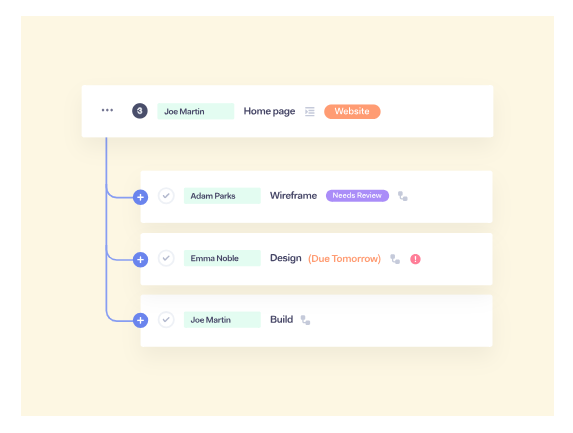
You can create tasks, break them into subtasks, assign them to multiple users, add priority levels, and set start/due dates.
Each task supports attachments, comments, time tracking, and dependencies.
You can also categorize tasks using tags and custom fields, helping you stay organized even in complex projects.

2. Project Templates
Project templates in Teamwork save tons of time by automating repetitive project setups.
You can build templates for client onboarding, product launches, marketing campaigns, and more.
These templates retain task lists, deadlines, dependencies, and team assignments — making them perfect for standardized workflows.
3. Built-In Time Tracking
With built-in time tracking, team members can log hours against specific tasks or projects.
Time entries can be marked as billable or non-billable, and you can view timesheets per user, per task, or by client.
This feature is ideal for service businesses, agencies, and consultants looking to track time for billing or internal analysis.

4. Milestone Tracking
Milestones act as major checkpoints within your project.
You can link tasks to milestones, and once all related tasks are complete, the milestone is marked done.
They help you track key delivery dates and monitor overall progress toward goals — especially useful for deadline-driven work.
5. Gantt Charts
Teamwork’s interactive Gantt chart gives you a visual timeline of your entire project.
You can drag and drop tasks to adjust dates, set dependencies, and quickly identify scheduling conflicts.
This feature is particularly useful for project managers working with long-term or multi-phase projects.
6. Team Collaboration Tools
Forget about long email threads and scattered updates.
Each task in Teamwork has its own comment thread where team members can discuss details, share files, and mention teammates.
You can also follow tasks to stay in the loop, and notifications ensure nothing is missed.

7. Client Access and Permissions
Teamwork allows you to give clients access to their projects with finely tuned permission levels.
You can control what they can see, comment on, or edit — making it easy to collaborate transparently without revealing internal tasks or sensitive data.
8. Workload & Resource Management
The Workload view shows how much work each team member has assigned for a given time period.
This lets managers balance assignments and avoid overworking team members.
It’s especially helpful when managing multiple projects simultaneously with the same team.
9. Billing and Invoicing
Once time is tracked, it can be converted into branded invoices directly in Teamwork.
You can bill by hour, fixed fee, or even recurring projects, and then export or sync with accounting tools like QuickBooks and Xero.
This is a huge plus for client service teams looking to streamline admin and get paid faster.
10. Custom Fields
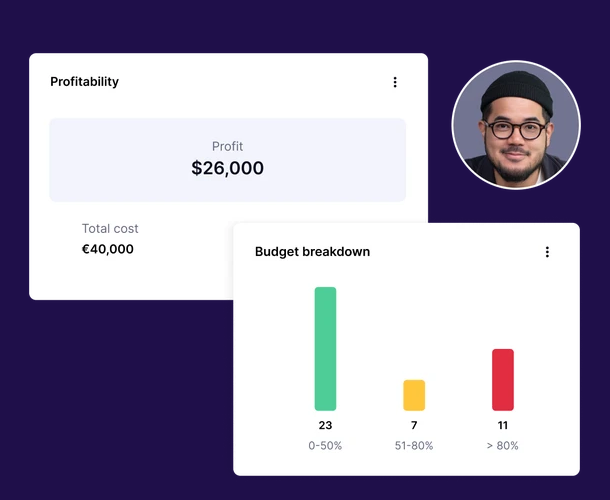
Custom fields let you collect and organize data that’s specific to your workflow.
For example, you can add fields like “Project Stage,” “Client Type,” or “Estimated Revenue.”
These fields are filterable and can be used in reporting to tailor Teamwork exactly to your business needs.
11. Calendar and Scheduling
The calendar view shows all tasks, milestones, and events across projects.
You can color-code items, sync with Google or Outlook, and view schedules by user or by project.
It helps keep teams aligned and avoids missed deadlines.
12. Kanban Boards
Teamwork offers a clean Kanban board view for users who prefer visual workflows.
You can move tasks between columns (e.g., To Do, In Progress, Review, Done), and customize the stages to suit any process.
It’s a perfect fit for agile teams or creatives who like to work visually.
13. Reports and Dashboards
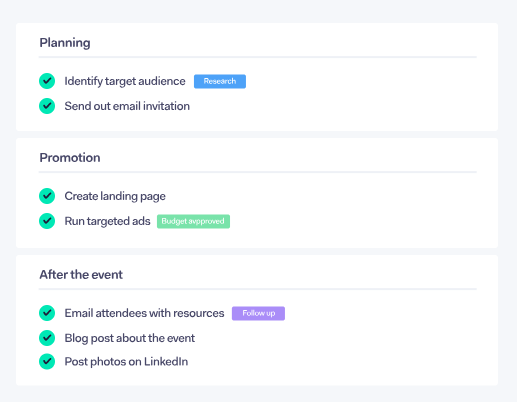
Teamwork includes real-time dashboards and customizable reports.
You can track project progress, time logged, team productivity, and billing data.
Whether you need internal visibility or client-ready summaries, the reporting tools are flexible and robust.
14. App Integrations
Teamwork connects seamlessly with tools like Slack, HubSpot, Google Drive, Dropbox, Microsoft Teams, Zoom, and over 1000 apps via Zapier.
This allows for better automation, real-time notifications, and a more integrated workflow without tool-hopping.

15. Mobile App (iOS & Android)
Teamwork’s mobile app gives you full control over projects, even when you’re away from your desk.
You can assign tasks, log time, check notifications, and respond to comments on the go.
It’s lightweight, fast, and ideal for remote teams or field professionals.
Advance Pricing Plan
These are the detailed version of teamwork according to which you can choose and opt for it.

- Free – Basic project tools for up to 5 users and 5 projects.
- Deliver ($10.99/user/month) – Adds templates, reports, teams, and 100GB storage.
- Grow ($19.99/user/month) – Includes budgeting, HubSpot, 50 templates, 600 projects, and 250GB storage.
- Scale (Custom) – For large teams needing full control, advanced reporting, and 500GB storage.
Who Should Use Teamwork?
If you’re wondering whether Teamwork is right for you or your team, here’s a breakdown of who will benefit most:
1. Agencies (Marketing, Creative, Web, SEO, etc.)
Teamwork was originally built with agencies in mind — and it shows.
Agencies often juggle multiple clients, tight deadlines, and a variety of deliverables. Teamwork allows agencies to organize each client into its own project, streamline collaboration with internal and external stakeholders, and track billable hours with precision.
Features like time tracking, invoicing, client permissions, and templates make it ideal for fast-paced agency environments.
2. Freelancers and Consultants
Freelancers who manage several projects or clients at once will find Teamwork to be an upgrade from spreadsheets or simple to-do apps. With its time logging, task lists, and billing tools, freelancers can stay organized and invoice more accurately.
Even solo consultants can benefit from creating separate workspaces for each client and managing deadlines efficiently.
3. Small to Mid-Sized Businesses (SMBs)
SMBs with growing teams need structured workflows without the complexity of enterprise tools. Teamwork offers just that — a scalable system that allows small businesses to track tasks, coordinate teams, manage resources, and improve internal processes.

4. Remote or Hybrid Teams
Teamwork is cloud-based and designed to support remote collaboration. With features like task comments, time zones, mobile apps, and integration with Slack or Microsoft Teams, it keeps distributed teams connected and aligned.
5. Service-Based Businesses
Any business that provides client services (accounting firms, legal consultants, coaching, etc.) will find value in Teamwork’s client-facing features. You can keep clients in the loop with selective access, project updates, and shared timelines.
6. Project Managers & Operations Teams
If you’re managing multiple projects, deadlines, and team resources, Teamwork’s workload, milestone, and reporting tools can be game-changing. You get full visibility into task status, individual performance, and overall team utilization.

7. Startups with Fast Growth
Startups often scale quickly and need tools that grow with them. Teamwork allows for phased implementation — start with basic task management, and scale up to include invoicing, resource management, and integrations as your team expands.
Pros & Cons
| Pros | Cons |
|---|---|
| Robust task and project management features | Can feel overwhelming for new users due to many options |
| Built-in time tracking and invoicing tools | Limited document editing compared to tools like Notion |
| Excellent for client collaboration with role-based access | |
| Highly customizable with templates and custom fields | |
| Scales well for teams of all sizes and remote setups |
Review Around The World
Rachel M., Marketing Agency Owner ⭐⭐⭐⭐
“Switching to Teamwork completely changed how we operate. I run a small agency, and we were drowning in email chains and missed deadlines. Now, every client has their own project space, tasks are crystal clear, and billing is a breeze with built-in time tracking. It’s like having a full-time project manager without the salary!”
Jason P., Freelance Web Developer ⭐⭐⭐⭐
“As a solo freelancer juggling 4-5 clients, Teamwork keeps me sane. I use it to track every task, log my hours, and send invoices at the end of the month. The templates save time, and I love that my clients can check on progress without chasing me. It’s professional, organized, and easy to use.”
Conclusion
Teamwork is a powerful project management tool built for teams, freelancers, and agencies who need more than just task lists.

It offers excellent features like time tracking, client access, and strong collaboration tools all in one place.
If you want to stay organized, deliver on time, and scale your workflow, Teamwork is a solid choice.
Frequently Asked Questions
Yes, there’s a free plan with basic features. Paid plans unlock advanced tools like time tracking and client access.
Yes, it’s great for freelancers managing multiple clients and projects.
Yes, you can invite clients with custom permissions to view or comment on projects.
Yes, Teamwork has built-in time tracking and invoicing features.
It integrates with Slack, HubSpot, Google Drive, Microsoft Teams, and more.
